What did Google launch on June 25, 2026?
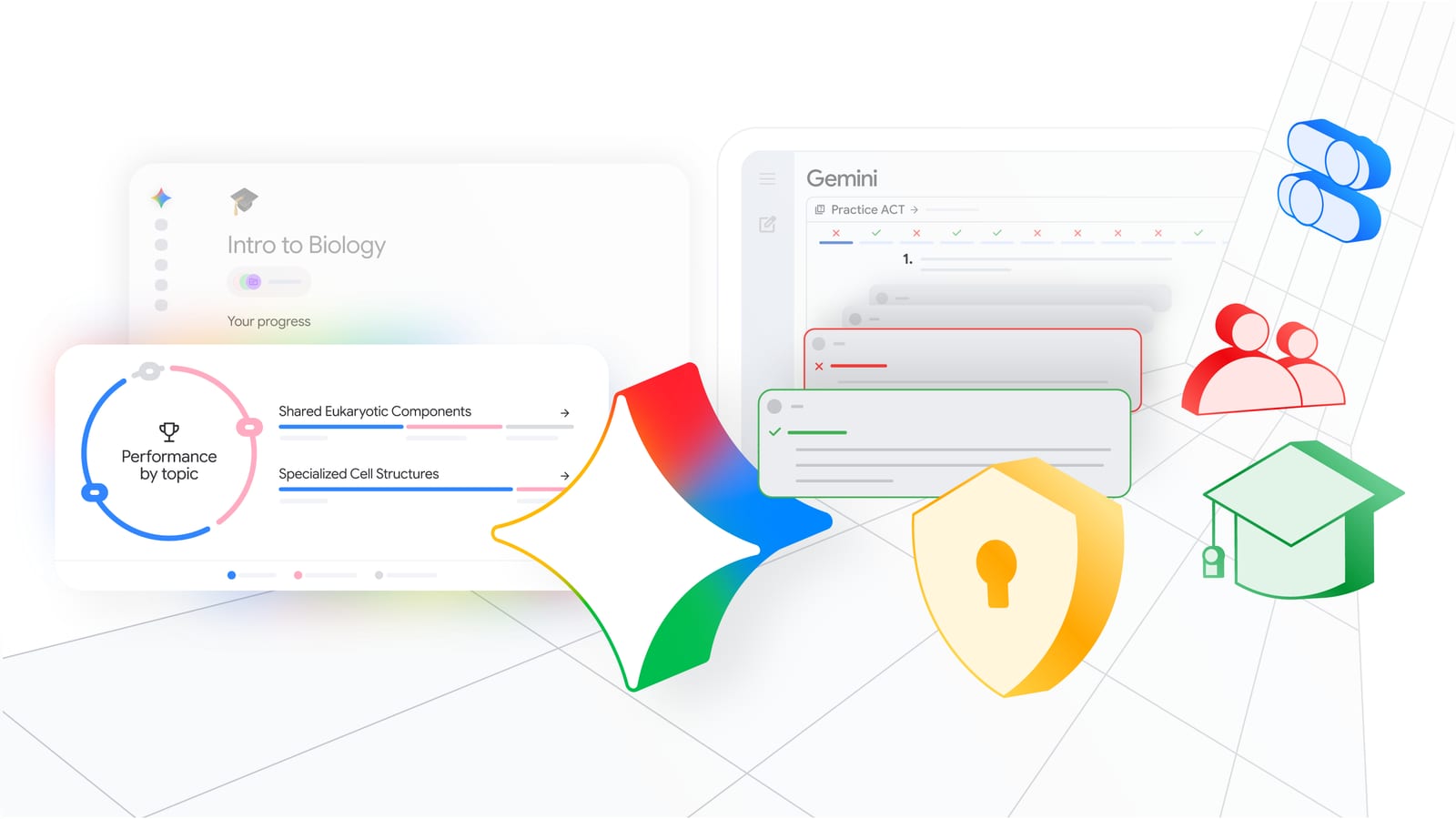
Google launched Study Notebooks in the Gemini app on June 25, 2026. The feature is free and available globally. It turns Gemini into a personal tutor that first measures a student's knowledge gaps, then builds a tailored learning path around them.
Carol Walport, Group Product Manager for the Gemini app, described it as "an interactive, adaptive space where each lesson recalibrates based on the student's results." According to pasqualepillitteri.it's coverage, the goal is not to generate answers but to walk students from diagnosis all the way to real understanding.
What are Gemini Study Notebooks, exactly?
Gemini Study Notebooks is a dedicated study workspace inside the Gemini app that runs a full learning loop — diagnostic quiz, personalized lesson plan, and continuous progress tracking — all in one place.
Study Notebooks are a specialized variant of the broader Notebooks feature Google has been building since April 2026. Notebooks give users a space to organize chats and files. The Study variant adds an adaptive learning layer on top of that foundation.
How do Study Notebooks work, step by step?
According to AlphaSignal's reporting, the workflow runs in six steps:
- Select "New notebook" in the Gemini side panel and choose the "Study" option
- Type your topic and a study goal — for example, "understand transformer attention mechanisms for an exam"
- Optionally upload class materials such as PDFs, lecture notes, or slides
- Take a diagnostic quiz that identifies weak spots
- Gemini builds a personalized lesson plan of bite-sized, interactive lessons
- A progress dashboard tracks performance, and lessons automatically update based on follow-up quiz results
The lesson plan is not static. It reshapes itself around what the student is actually getting wrong.
You might also like


What can Gemini do with uploaded materials?
Once a student uploads course materials, Gemini can transform them into study guides, quizzes, flashcards, and presentations. The diagnostic quiz runs against those materials to identify specific gaps before any lessons begin.
Students can also sync Study Notebooks with NotebookLM. That connection enables more efficient workflows directly from Gemini, since Notebooks already sync across Google products.
How does this connect to Google Classroom?
Google is also bringing teacher-led AI activities to Google Classroom. In the coming months, those activities will cover Guided Learning in Gemini, Study Notebooks in Gemini, and NotebookLM. Teacher-led AI experiences will also be available in select learning management systems beyond Google Classroom.
Here's what we know so far: the classroom rollout is framed around keeping educators in control. Google describes teacher-led activities as providing students with "a distraction-free, curriculum-informed space" while giving teachers visibility into student progress.
Study Notebooks vs. standard Gemini chat — what's different?
| Feature | Standard Gemini chat | Study Notebooks |
|---|---|---|
| Interface | Blank chat window | Structured study workspace |
| Personalization | None by default | Diagnostic quiz sets baseline |
| Lesson plan | None | Adaptive, updates after each quiz |
| Progress tracking | None | Dashboard tracks performance over time |
| Material upload | Supported | Supported; used to build quizzes and lessons |
| Sync with NotebookLM | Via Notebooks | Yes, built in |
| Cost | Free (Gemini) | Free |
Who is this for?
The feature targets students at any level. Google's own announcement cited examples ranging from organic chemistry exam prep to standardized test preparation. Carol Walport stated that "personalized learning should be within reach for everyone."
The Google blog announcement frames the broader push as AI grounded in learning science, built for both students and educators, with data kept private and secure.
For builders thinking about agentic AI work, the Study Notebooks architecture — diagnose, plan, execute, re-evaluate — mirrors the loop structure showing up across AI products in 2026. Google's education push also follows a wider pattern of AI reviews partnerships between major platforms and institutions. And as AI tools move deeper into structured workflows, the question of government and institutional oversight of those systems continues to grow.
Frequently asked questions
Is Gemini Study Notebooks free to use? Yes. According to AlphaSignal's reporting, Study Notebooks is free. Google's announcement frames personalized learning as something that "should be within reach for everyone," and no paid tier or subscription requirement is mentioned in the sources for the Study Notebooks feature itself.
When did Google launch Study Notebooks in Gemini? Google launched Study Notebooks in the Gemini app on June 25, 2026. Carol Walport, Group Product Manager for the Gemini app, introduced the feature on that date as an interactive, adaptive learning space that recalibrates lessons based on each student's quiz results.
How does the diagnostic quiz in Gemini Study Notebooks work? After a student creates a new Study notebook and optionally uploads course materials, Gemini runs a diagnostic quiz to identify knowledge gaps. The results feed directly into a personalized lesson plan. Follow-up quizzes then trigger automatic updates to that plan, so lessons shift based on what the student is still getting wrong.
Can students upload their own class materials to Study Notebooks? Yes. Students can upload PDFs, lecture notes, and slides when setting up a Study notebook. Gemini uses those materials to build quizzes, flashcards, study guides, and presentations. The uploaded content also informs the diagnostic quiz and the personalized lesson plan that follows.
How do Study Notebooks connect to NotebookLM? Study Notebooks sync with NotebookLM because they are built on the broader Notebooks feature Google has been developing since April 2026. That sync allows students to access more efficient workflows directly from Gemini. Notebooks serve as personal knowledge bases shared across Google products, and the Study variant adds the adaptive learning layer on top.




0 Comments
Log in to comment
Not a member yet? Join the community
Pick a meme
KlipyHave a great take?
Drop your email — we'll send a magic link so you can post it. No password.
Not a member of the community? Join today.
Join the community →